Simplifying and Securing Observability and Monitoring Data
Tavve’s Ranger platforms aggregate logs, metrics and traces into intelligent data pipelines, and secure critical IT management traffic across disparate network boundaries.


Cost savings
Faster MTTR
- Neil McCorkle, Security Architect
“The entire engagement with Tavve was refreshing. Tavve listened to what we requested instead of prescribing what we must have, while consulting us along the way. Once the requirements were clear, Tavve’s engineering built exactly what we needed.”
Effortlessly manage your telemetry log metric trace pipelines
Orchestrate Observability Data
Enhance your observability landscape by taking control of your telemetry pipelines, filtering out the noise, and improving your security posture.
Increase Visibility
Identify high-value and low-value data and simplify troubleshooting with clear visibility into telemetry pipelines to help drive accurate and improved decisions.
Optimize Application Performance
Filter unnecessary data, reduce data pipeline congestion, and optimize infrastructure and workloads.
Extend Management Applications
Flexible Event Distribution
Simplify event distribution across application collection layers, and avoid vendor lock-in.
Reduce Administration Cost
Ease-of-use, efficient workflow, and intuitive user interface accelerates time-to-value and reduces administrative overhead
Deeper visibility and easier pipeline management
Unlock cost savings by optimizing telemetry pipelines. Support audit and compliance initiatives with detailed metrics and reporting. Insulate and extend management applications across security boundaries. Simplify network management by delivering increased network visibility.

Reduce Data Congestion and Realize Savings
Organize and control your telemetry pipelines with Flexible Data Forwarding to route high-value data to the right tool for the right job, while routing full-fidelity data to lower cost storage.
Improve network insights by visualizing data flows through statistical analysis and early-warning anomaly detection for application, IT, and security events, improving proactive, data-driven decision making.
Reduced MTTR:
Reduced Event Vol:
Avg Cost Savings:
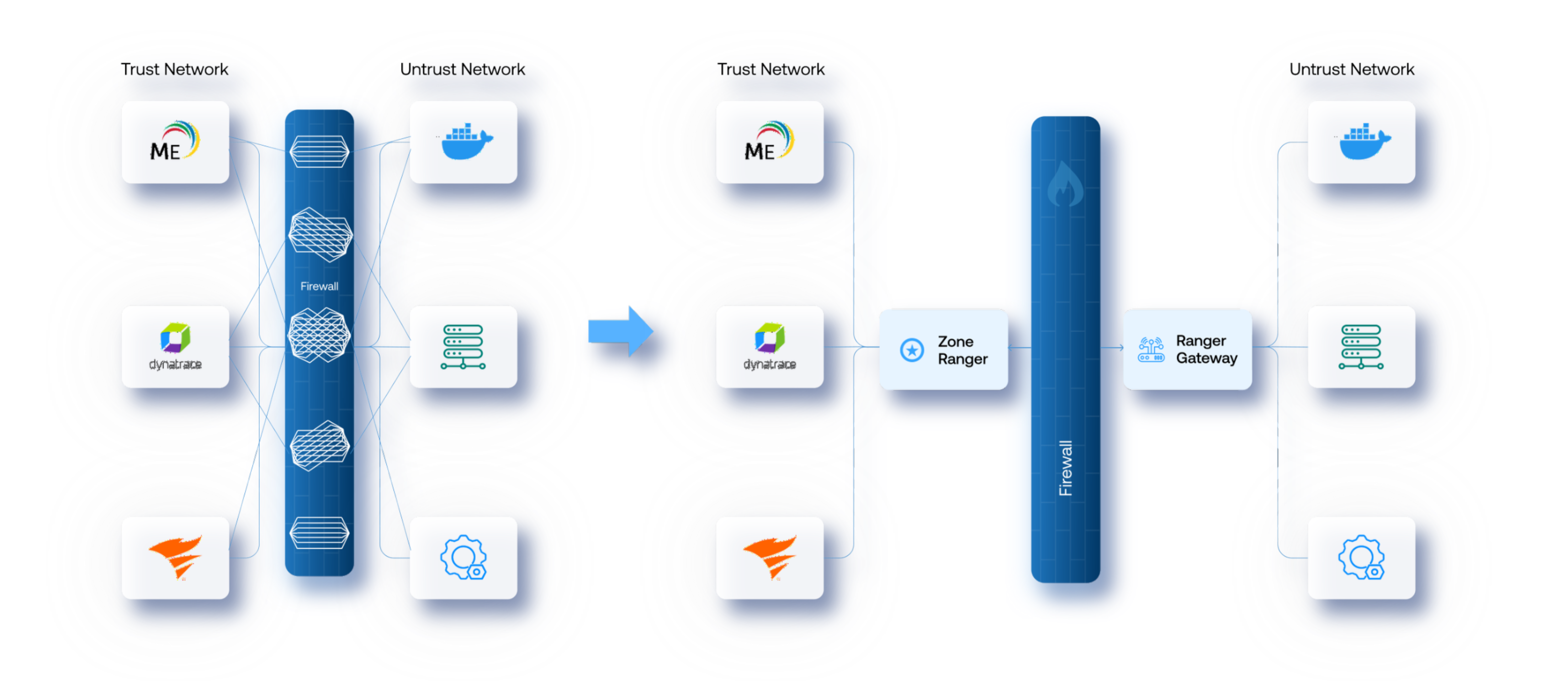
Secure solution for monitoring and managing beyond the firewall
Managing difficult to reach areas of the network with a cost effective, easy to install, intelligent solution that can be deployed anywhere in your network with minimal expertise and administrative overhead.
Cost savings
Faster MTTR
- Senior Systems Engineer
We are using PacketRanger's Statistical Analysis capabilities daily. It sets PacketRanger apart from other telemetry management solutions. It takes us less than 10 seconds to answer incoming questions because of the ease by which the information is presented. Tavve is be our telemetry pipeline management solution for the foreseeable future.
Start building simplified and cost-effective telemetry pipelines
Try any of Tavve’s solutions for free, or get in touch with an expert for a custom demo.
- 14-day free trial
- No credit card required
- Cancel anytime